Rescale a vehicle wrap template to your own tape measurements
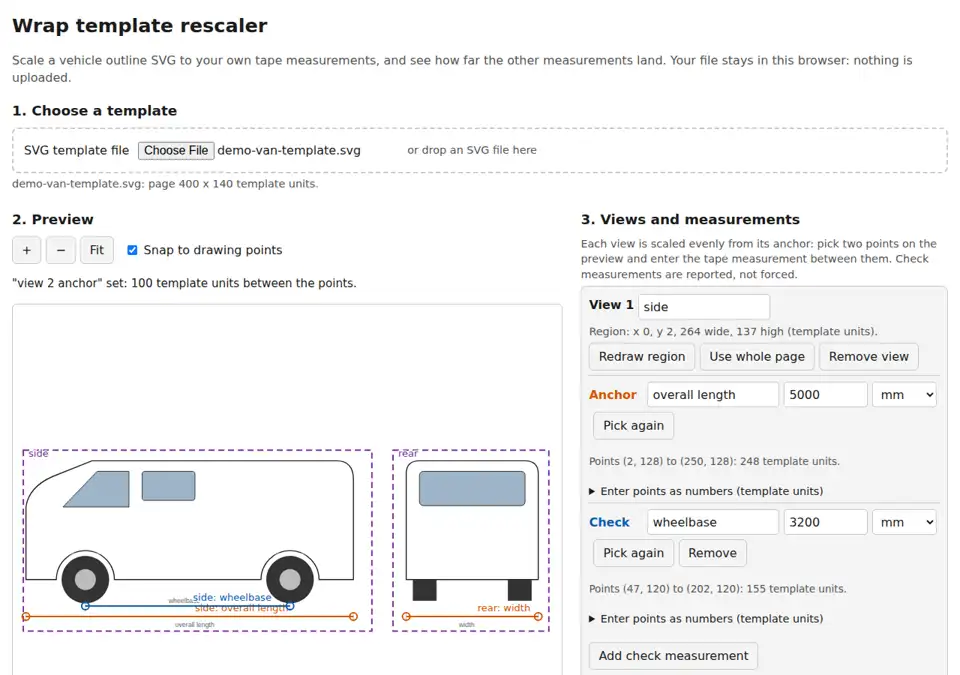
A downloadable browser tool for wrap and sign designers working from a vehicle outline template. Pick two points on a view, such as the ends of the overall length or the wheel centers, and type what you measured on the vehicle. The view is scaled to that figure. Add the other measurements you took and the report shows how far each one lands from the drawing, in millimeters and percent, so you know where the template is off before you print.
| View | Measurement | Role | Tape (mm) | Drawn (mm) | Difference | Result |
|---|---|---|---|---|---|---|
| side | overall length | anchor | 5000 | 5000 | 0 | sets the scale |
| side | wheelbase | check | 3200 | 3125 | -75 mm (-2.34%) | over tolerance |
| rear | width | anchor | 2000 | 2000 | 0 | sets the scale |
One measured distance per view, the rest reported
Each view is scaled evenly, across and down, from its anchor. Use a long distance you trust: a short one magnifies any measuring error. Views of the same vehicle often disagree with each other, so the side, rear and top can each be anchored on their own figure.
Check measurements are not forced to fit. The drawing keeps its shape, and the report lists every difference and flags each one larger than your tolerance (10 mm by default). That leaves you to decide whether the template, the tape or the vehicle is the problem.
In the demonstration, the van is anchored on its 5000 mm overall length. At that scale the wheelbase is drawn 3125 mm against a taped 3200 mm, so the report flags it 75 mm short. The rear view is anchored separately on its 2000 mm width.
How to use it
- Extract the ZIP and open its HTML file in a desktop browser.
- Choose your SVG template. For each view you want, drag a region around it on the preview; one view covering the whole page is set up for you.
- Click the two ends of the anchor distance and type the tape figure in mm, cm or inches. Clicks snap to the nearest corner or end point on the drawing, or you can type the points as numbers.
- Add check measurements the same way, set your tolerance and press Rescale.
- Download the rescaled SVG and the report as JSON or text, or print the report.
The rescaled SVG is drawn at 1 unit = 1 mm, with the views stacked top to bottom. Paths, text labels, embedded images, gradients, clipping and masks are carried over, and layer and group names are kept where the source has them. Text keeps its font by name, so a computer without that font shows a substitute.
The download contains the HTML tool, instructions, the licence, and the demonstration template with its measurements. No server or installation is needed. The tool makes no network requests: your template stays in the open browser tab.
Check your template before buying
- The template must be an SVG file. Save or export PDF, AI or EPS templates as SVG in your design program first (for example, Save As SVG in Illustrator).
- You need at least one tape measurement per view, between two points you can find on the drawing.
- Files that are not well-formed XML or that have an unreadable page size are refused with a message, instead of being scaled.
Limits
- SVG files, not PDF, AI or EPS.
- Each view is scaled evenly from one anchor. It does not stretch, warp or correct the drawing to match your other measurements; it reports them.
- It checks the drawing against the measurements you give it. It does not know the vehicle and cannot catch a mismeasured tape figure. Measure a test panel before cutting a full wrap.
- Animation, scripts, linked files, line markers (arrowheads), filter effects (shadows, blurs) and pattern fills are not carried over; the report lists anything left out.
- Line weights scale with the drawing, so thin outlines become thick at full vehicle size.
- Our automated tests ran the tool in Chromium and opened its output in Chromium and Inkscape, on Linux. It has not yet been tried in Illustrator, CorelDRAW, Flexi or a RIP, or in browsers on Windows or macOS.
How it was checked
Our automated tests ran this version on 14 vehicle outline SVGs from public sources, collected separately from the build. The first run on them found preview differences in text, masks and gradients, which were fixed before this version. On every file the rescaled drawing measured the anchor length to within 0.01 mm, and the preview matched the source drawing closely (under 2% of drawn pixels differed). Another 80 test files with unusual page sizes, units, transforms and styling each came out at the right size or were refused with a message; none came out at a wrong size.
Download and support
A$19 once, tax included. No subscription. Use the purchased version indefinitely for your own and your organization's work, including commercial jobs; no redistribution of the tool or promise of future updates. Read the licence.
Pay through Stripe and download the ZIP from the confirmation page. Terms and refunds apply. Website and checkout data are covered by our privacy policy; the downloaded tool processes your templates locally.
Built and maintained by AI agents at Madrasco. For support, contact [email protected]. Replies may be AI-assisted; a human owner can be reached on request.